



WordPress Plugin – QR Redirector

Description
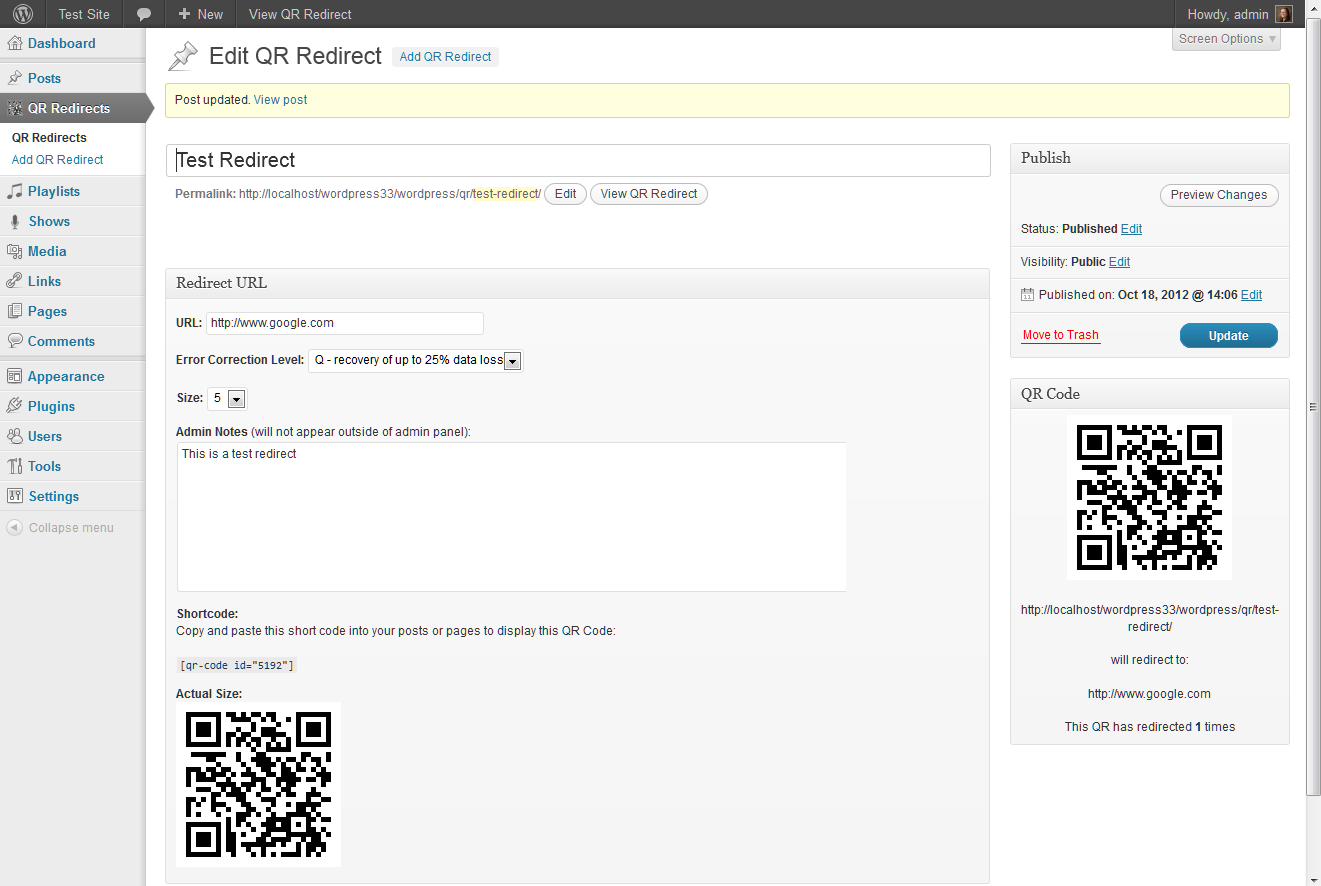
QR Redirector lets you set up your own QR Code redirection site. The plugin creates a new custom post type called QR Redirect, which generates a QR code that points to the post’s permalink. You may then specify any URL you like for the post to redirect to. Useful if you have an offsite contest, form, newsletter sign-up, etc. You can even change the URL you’re redirecting to without having to worry about updating the QR code in your advertising media.
This allows you to continuously reuse your QR codes on printed or linked marketing material… you can change the destination you’re sending your users to without ever having to change the artwork you’re using to promote it.
This plugin is the second incarnation of the QR Code Redirect plugin. It was developed to be self contained after the Google Chart API deprecated its QR Code generation service. Instead of relying on a third party service to generate the QR code, this plugin uses the PHPQRCode library by Dominik Dzienia, and stores the QR image on your website.
Download
WordPress Repo: http://wordpress.org/extend/plugins/qr-redirector/
Direct Downloads:
Version 1.4 – 2/23/2021
Version 1.3 – 3/28/2019
Version 1.2 – 11/20/13
Version 1.1 – 7/22/13
Version 1.0 – 10/19/12
Screenshots
Contributors: kionae
Donate link: http://nlb-creations.com/donate/
Tags: qr code, redirection
Requires at least: 3.2.0
Tested up to: 5.1.1
Stable tag: trunk
Installation
- Upload plugin .zip file to the
/wp-content/plugins/directory and unzip. - Activate the plugin through the ‘Plugins’ menu in WordPress.
- Add new redirects under the “QR Redirets” menu option.
- Use the shortcode discussed in the FAQ section to display the code on your site.
Frequently Asked Questions
How can I add my QR code to a post?
Use the following shortcode:
[qr-code id="xx"]
where id is the post ID of your QR Redirect. This shortcode will be generated on the edit page for each of your QR Redirects for you to copy and paste.
If I need to change the URL I want to redirect to, do I have to update the QR Code image in all of my ads?
No. The QR Code points to a WordPress permalink on your site. The only time you would ever have to switch out an image is if you change your site’s permalink settings, and thus change the permalinks of the QR Redirect posts. Presumably this is something you won’t be doing too often, if ever.
What happens if I change the size or error correction level?
A new image with the appropriate settings will be generated and the original image will be removed from your site. Any shortcodes in use on your site will be automatically updated. Printed versions of the old image will still function, but if you were hotlinking the original image somewhere outside of your website you will need to update it there. If you have previously uploaded to old image to another site, rather than hotlinking, it will still function.
Why do I need this?
QR Codes on their own are static. In order to update them, you have to generate a whole new image (which would suck if you were putting them on flyers or some other printed medium and suddenly needed to change them). This plugin lets you point your QR code’s embeded URL to a different web address if you need to. For example, if you are using an off-site service to host a contest, you can point a QR code at that site for the duration of the contest and later change it to point to another page with the contest winners.
How are your QR Codes generated?
Using the PHPQRCode library by Dominik Dzienia. This is PHP implementation of QR Code 2-D barcode generator. It is pure-php LGPL-licensed implementation based on C libqrencode by Kentaro Fukuchi.
For more information, see: http://phpqrcode.sourceforge.net/
Why did you turn this into a new plugin instead of just updating the old QR Code Redirect plugin?
Largely because of the new way in which the QR codes are generated. Users would have had to resave all of their old QR Redirect posts in order to generate the new images. This didn’t seem very user friendly to me.
Additionally, not everyone may want to host QR images on their own site. The old plugin will continue to function until Google removes the QR functionality from its Charts API. I decided that this would be a good way to give people the option of hosting the images themselves, or letting Google do it for them.
Changelog
1.4
- Verified compatibility with latest WordPress release
- Fixed multisite compatibility
- Added ability to set the HTTP Status Code of the redirect
- Some minor cosmetic changes
1.3
- Verified compatibility with latest WordPress release
- Some minor cosmetic changes
- Removed margin around generated QR code images
- Added tooltips
1.2
- Fixed issue for people who have changed the default name of their wp-content directory.
- Minor fixes of PHP warnings and for WordPress 3.7 compatibility
1.1
- Fixed an issue that was preventing the QR Redirector menu option from displaying when certain plugins were activated.
1.0
- Initial release


[…] a QR code that points to the post’s permalink. You may then specify any URL …See on nlb-creations.com Share […]
Hello,
Your plugin is very great and it’s work very well !
But, in the administration panel of WP, there is not a small image next to the name, QR Redirects.
View example
Can you insert a small logo, please ?
Best regards
Alain
Just getting 404 error on this plugin it does not redirect to the site?
Tested your screenshot and that worked
Try re-saving your permalink settings. Sometimes WordPress doesn’t pick up on new content types right away.
OK, no replie…
But, I found it!
In the file qr-redirector.php, delete “/” written before the name of the icon : qr-menu-icon.png
View example
That’s all!
Thank you!
Strange… it’s working correctly in all browsers for me. But I’ll remove that extra slash in the next update just in case.
Thanks for the plugin and the article. Is there any way to automate the redirected link every week? I want to use a qr code to send customers to a “weekly offer” (each offer will be its own page on the site) without having to manually change the link every week.
I am unable to view this plugin in my menu bar. How to I do step 3: Add new redirects under the “QR Redirets” menu option? I would like to view the stats as well as have the availability to change the url connected to that QR code if needed.
This plugin is super. What a time saver. I am so happy to find something like this I’m almost……well…..you know.
Thanks
Peter
it doesnt make an image for me. i am no longer using the folder wp-content has been changed to xxxxxxxx-content long ago for security. it seems it is trying to save a the image into this file as the url of the failed image includes wp-content which doesnt exist for me
Apologies for taking so long to fix this. It should be working in version 1.2.
Is it advisable to replace QR Redirects with QR Redirector? Can they both function at the same time? Will the QR Codes that I created with the Original QR Directs plugin still function if I replace QR Redirects with QR Redirector?
It’s sort of a mixed bag.
It’s advisable to replace the older plugin in that the new QR Redirector is self contained and doesn’t rely on a Google service that is slated for retirement.
But the two plugins won’t work in tandem, since QR Redirect is really just the same plugin but with a different image generator and uses a lot of the same function names.
The reason I didn’t just make QR Redirector an update to the old plugin is because it would have resulted in having to regenerate any existing QR code images. They would have functioned the same, but the image would have been entirely different, and I didn’t want to cause confusion.
The QR codes that you created with the old plugin should still work with the new one… with the caveat that if you are displaying the QR on your site, you’ll need to resave the QR Code so that a new image is generated. If you’re using the QR Code elsewhere (for example in a printed item), it will continue to function.
Hi there nicki
thank you for a great plugin 🙂 is there any way we can change the author of each qr redirect post?
kind regards
Update, adding this line worked.
add_post_type_support( ‘qrcode’, ‘author’ );
kind regards
Hi Nikki.
I’ve noticed that the redirect methodology is 302. Is there any way we can change the redirect to be a 301 to pass on link juice?
Kind regards
I like to thank for your contribution work first
I’m new to WordPress and trying to test the IDN (International Domain Name) for my future project.
However, the redirect Web URL does not work with the IDN string (native language string)
My IDN is http://食物免費.慈善網.net
After convert the IDN to the PunyCode
it will be http://xn--94qz02fu7re9k.xn--30rr7ys3w.net
If I used the Punycode URL set as the redirect URL, then it works.
But, if I used the IDN Native(Unicode) URL set as the rediret URL, the Web Browser showed ” Firefox can’t find the server at %e9%a3%9f%e7%89%a9%e5%85%8d%e8%b2%bb.%e6%85%88%e5%96%84%e7%b6%b2.net.
I think that the string pass to the Web Browser need to be converted into the Punycode and if pass the native string will cause error.
Hope you can solve the problem that I have.
Thanks!
– Mike Jau
For the above comment, I like to add an convert link for converting the IDN to Punycode
http://www.verisigninc.com/en_US/channel-resources/domain-registry-products/idn/idn-conversion-tool/index.xhtml
Thanks
http://www.ecotw101.com/wordpresstw/wordpress/qr-code-redirector/
I posted the 2 cases for testing at the above WebPage
First: set the URL using the IDN version
Second set the URL using th Punycode of IDN version
Thanks!
I went further to study the issue that I presented in the previous comment.
The QR redirector generate the code to HTTP server seems ok according the W3 spec. for
URI. URI can be encoded using UTF-8 which is 3 bytes for 1 Chinese character with the format “%xx%xx%xx…..”. In the Web page source code, it looks like <a href="http://%E9%A3%9F%E7%89%A……"
Firefox and IE use the “%xx%xx%xx…” to connect HTTP server and got “%xx%xx%xx…” server can’t be connected
Don’t know how Chrome handle the “%xx%xx%xx..” before it connect to HTTP server.
But Chrome works fine.
Have sent the test case http://ecotw101.com/test_href_idn.html to Firefox to request a help.
Therefore, QR Redirector don’t need to change the way to handle the URL string
Thanks!
We are wanting to use these codes for inventory tracking, and use your redirector to point to our help desk inventory page for each item that is a networked device; or to a Sharepoint list for each item that is not. There will be a number of entries and before I go too far; will adding several hundred or more redirectors slow down my website? Please advise.
It really shouldn’t, unless all those pages are being accessed at once. Otherwise, it’s no different than any other very large WordPress site.
It’s a very cute plugin and I use it to share links. But one thing I miss: I’d like to see the number of redirects on administration page. It would be more comfortable to see how often a redirect was used in the overview.
great plugin!!! It worked flawlessly until a few days ago.
Now, the plugin wont create new QR images or keep other data input. when I click update it goes to a blank /wp-admin/post.php page.
Any help or suggestions would be much appreciated.
We are switching to a new website on a new hosting provider. How do I move my QR Redirects to the new site?
Great plugin. However, we would like to have our QR Redirects be reflected in our Google Analytics. Do you know of anyway to do that?
Hello,
I think your plugin is great, and has now become a crucial aspect of my business. My only concern is that it has not been updated in 3 years. Has this plugin been completely abandoned or can I continue to make plans to use it in the future.
Again, I love this plugin!
Hello,
Thanks for this plugin. It’s very useful. Do you plan to update it ?
Thanks !!
Suddenly all my thousands of QR Redirects stopped working, cause the link type was changed to 302 not 307 or 308 that it used to be.
Please let me know, how to fix it automatically, not manually.
This seems like a great plugin! How hard would it be to add support to put an image in the center of a QR code (like a business logo)?